> ## Documentation Index
> Fetch the complete documentation index at: https://docs.byom.co/llms.txt
> Use this file to discover all available pages before exploring further.
> ## Agent Instructions
> Use the current public BYOM documentation and cite the relevant page. Preserve availability, permission and undo limits.
> The public documentation MCP retrieves guides. Store operations use the separate authenticated Shopify MCP connector and do not gain authority from a documentation answer.
> If a contract, capability or price is not documented, say so. Do not invent endpoints, tools, availability or merchant outcomes.
# Integrations
> Understand what BYOM can read or change through each authorised service.
Integrations shows the authorised links between your company and supported services. A connection provides access; its current permissions and capabilities determine which work is available.
## Three checks before work
1. Is the expected service connected to the correct company and store?
2. Does the provider grant the permission needed for this task?
3. Is the requested capability available to your account?
A provider logo or a listed integration is not proof that your company has a working connection. Check the connection's current state and the capability needed for your task.
## Reads and changes
Reading product information and changing a product are different permissions. A connected Shopify store may support a catalogue question while a write remains unavailable. Similarly, order and customer data need their own authorised access.
An Action approval authorises a specific change; it does not repair an expired connection or add a missing provider scope. Fix the access issue separately, then review the proposal against the current source data.
## Example
You ask Kina to explain why a product is missing from a collection. A read-only connection may be enough to investigate. Moving the product requires the supported change capability and the appropriate review.
## Inspect a specific integration
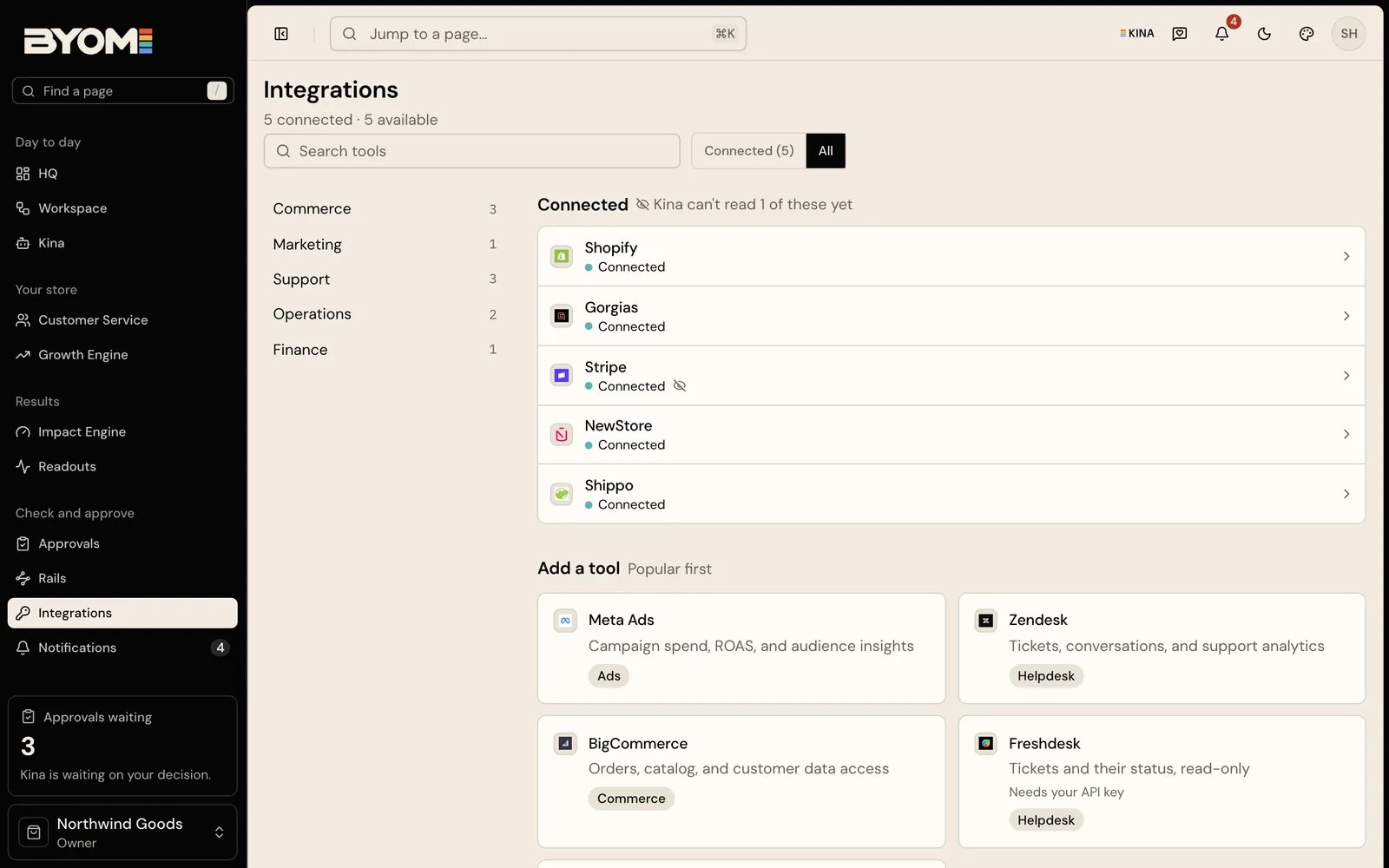 Open **Integrations**, then the relevant connected service. Check that it is the expected store or account before troubleshooting capability. The page distinguishes tools already connected from tools available to add; a service shown as coming is not ready to use.
In the detail view, **What Kina can do** translates the available tool permissions into useful operations. Open **Access and scopes** when a task depends on a particular provider permission. Activity and the last-checked information help distinguish an old connection from a recently checked one.
Use **Check connection** to ask for current health and tool permissions. If the connection needs renewed authorisation, use its reconnect control and complete the provider's supported consent flow. Checking a connection and reconnecting it solve different problems: the first inspects the existing link; the second can renew access.
## Read the state before choosing a remedy
| State or symptom | Interpretation | Next step |
| - | - | - |
| Connected and usable | The authorised link is available. | Check that the specific operation appears under What Kina can do. |
| Connected but degraded | The link exists, but health or permissions are impaired. | Read the stated reason and check or reconnect as appropriate. |
| Expired or disconnected | Current provider access is unavailable. | Reconnect if you are authorised to do so. |
| Permission missing | The provider has not granted the required scope. | Complete the appropriate provider permission process. |
| Capability permissions not yet returned | BYOM cannot yet describe the usable tools. | Check connection; do not infer capability from a logo. |
## Worked example: product access without order access
North Coast Goods can ask about descriptions and inventory using its authorised catalogue connection. A later question asks which customers have unfulfilled orders. That request needs different data and permissions.
A refused order question can reflect missing order access while the catalogue connection still works. Check the optional order/customer access required for that work. If it is unavailable, Kina should explain the missing source instead of treating it as a zero-order result.
Likewise, permission to read a product does not grant permission to update it. A supported product change needs provider write access and its own approved proposal.
## Disconnect deliberately
**Disconnect** is a consequential access change. Use it when you intend to end that provider link, not as a general refresh button. Read the confirmation and consider jobs that depend on the service. A later run can lose its source or its ability to complete.
Disconnecting prevents further work through that connection. It does not prove historical records have been erased. Use the applicable privacy process for deletion, and avoid putting provider credentials into support screenshots or company notes.
Reviewed 2 October 2026.
## Related guides
* [Your first session](/start/first-session)
* [Data and access](/trust/data-and-access)
* [Troubleshooting](/guides/troubleshooting)
## Related topics
- [MCP connector](/developers/mcp.md)
- [Developer overview](/developers/overview.md)
- [BYOM, in plain language](/ai.md)
- [Understand a Readout](/guides/understand-a-readout.md)
- [Readouts](/product/readouts.md)
This documentation is built and hosted on [Mintlify](https://mintlify.com), a developer documentation platform.
Open **Integrations**, then the relevant connected service. Check that it is the expected store or account before troubleshooting capability. The page distinguishes tools already connected from tools available to add; a service shown as coming is not ready to use.
In the detail view, **What Kina can do** translates the available tool permissions into useful operations. Open **Access and scopes** when a task depends on a particular provider permission. Activity and the last-checked information help distinguish an old connection from a recently checked one.
Use **Check connection** to ask for current health and tool permissions. If the connection needs renewed authorisation, use its reconnect control and complete the provider's supported consent flow. Checking a connection and reconnecting it solve different problems: the first inspects the existing link; the second can renew access.
## Read the state before choosing a remedy
| State or symptom | Interpretation | Next step |
| - | - | - |
| Connected and usable | The authorised link is available. | Check that the specific operation appears under What Kina can do. |
| Connected but degraded | The link exists, but health or permissions are impaired. | Read the stated reason and check or reconnect as appropriate. |
| Expired or disconnected | Current provider access is unavailable. | Reconnect if you are authorised to do so. |
| Permission missing | The provider has not granted the required scope. | Complete the appropriate provider permission process. |
| Capability permissions not yet returned | BYOM cannot yet describe the usable tools. | Check connection; do not infer capability from a logo. |
## Worked example: product access without order access
North Coast Goods can ask about descriptions and inventory using its authorised catalogue connection. A later question asks which customers have unfulfilled orders. That request needs different data and permissions.
A refused order question can reflect missing order access while the catalogue connection still works. Check the optional order/customer access required for that work. If it is unavailable, Kina should explain the missing source instead of treating it as a zero-order result.
Likewise, permission to read a product does not grant permission to update it. A supported product change needs provider write access and its own approved proposal.
## Disconnect deliberately
**Disconnect** is a consequential access change. Use it when you intend to end that provider link, not as a general refresh button. Read the confirmation and consider jobs that depend on the service. A later run can lose its source or its ability to complete.
Disconnecting prevents further work through that connection. It does not prove historical records have been erased. Use the applicable privacy process for deletion, and avoid putting provider credentials into support screenshots or company notes.
Reviewed 2 October 2026.
## Related guides
* [Your first session](/start/first-session)
* [Data and access](/trust/data-and-access)
* [Troubleshooting](/guides/troubleshooting)
## Related topics
- [MCP connector](/developers/mcp.md)
- [Developer overview](/developers/overview.md)
- [BYOM, in plain language](/ai.md)
- [Understand a Readout](/guides/understand-a-readout.md)
- [Readouts](/product/readouts.md)
This documentation is built and hosted on [Mintlify](https://mintlify.com), a developer documentation platform.