> ## Documentation Index
> Fetch the complete documentation index at: https://docs.byom.co/llms.txt
> Use this file to discover all available pages before exploring further.
> ## Agent Instructions
> Use the current public BYOM documentation and cite the relevant page. Preserve availability, permission and undo limits.
> The public documentation MCP retrieves guides. Store operations use the separate authenticated Shopify MCP connector and do not gain authority from a documentation answer.
> If a contract, capability or price is not documented, say so. Do not invent endpoints, tools, availability or merchant outcomes.
# Kina
> Ask your commerce operator to investigate, explain and prepare work in your company context.
Kina is BYOM's AI operator. Ask it to read available information, investigate a question, calculate, compare options or prepare a draft. Review proposed Actions before consequential external changes are made.
## Give the work a clear shape
A useful request names the subject, the desired output and the constraint:
> Review the description of our linen shirt. Use the product facts and our tone of voice. Draft a clearer version, flag unsupported claims and show the sources.
Follow-up questions can refine the work: “Make that shorter”, “Explain why that claim is unsupported”, or “Compare the current and proposed wording”. Keep refining the draft until it is ready to review.
## Check the evidence
Look for the source, the period covered and any missing information. A polished answer can still be limited by an unconnected service, a stale source or a provider's permissions. If the evidence is incomplete, ask what is missing before making a decision.
Kina should explain what it prepared and what remains to be done. An answer in a conversation does not by itself prove that a provider change happened. Use the Action and its receipt for that.
## Use the right company and source
Your company context, account permissions and connected capabilities bound what Kina can read and prepare. Asking in natural language does not expand those permissions. For customer enquiries, avoid pasting unnecessary personal data into a conversation; use the supported, authorised source.
## Complete an investigation, then choose its next step
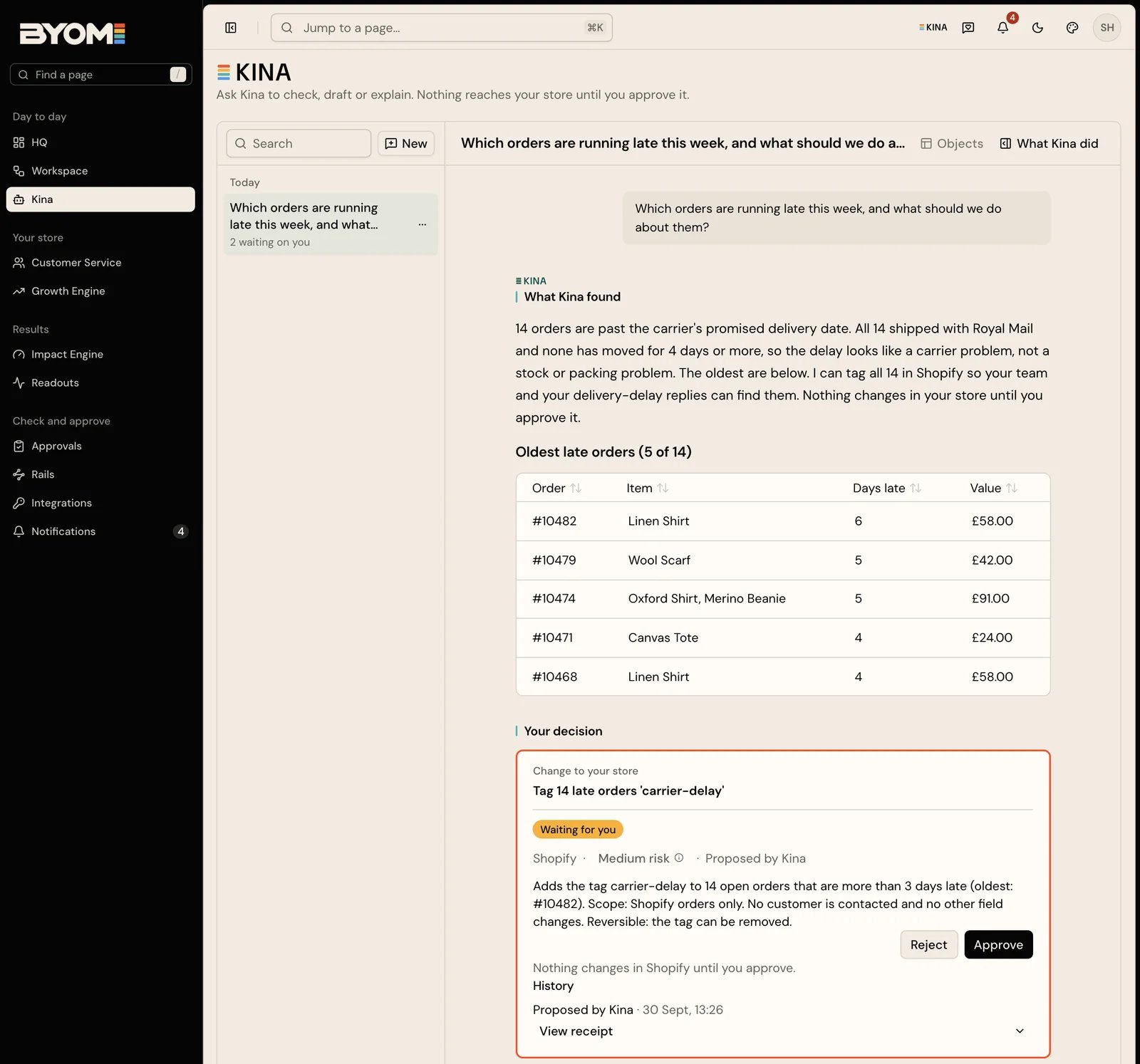 Before you begin, confirm that you are working in the right company and that the source you want to use is available. You can ask Kina for a general explanation without a store connection; a question about your own stock, orders or trading needs the relevant authorised evidence.
For an investigation:
1. **Define the subject.** Name the product, work record or enquiry. For a trading question, specify the dates and whether you mean a count, a rate or a monetary amount.
2. **Request an inspectable output.** Ask for the source facts, a conclusion and the uncertainty. If you need a draft, identify the intended audience and constraints.
3. **Check the result before continuing.** Open the cited source where available. Follow up in the conversation to resolve a missing fact or correct a mistaken assumption.
Kina's response can include cited sources and prepared output. The response controls include **What Kina did**, where available, to inspect the work behind the reply. Use **Put this on your board** when you want to carry a reply into Workspace rather than leave the useful result only in the conversation. Attaching a reply to a board creates an internal work record; it does not publish the reply to customers.
## Worked example: an unsupported product claim
The fictional merchant North Coast Goods asks Kina to review a cotton overshirt. The product record says “100% cotton” and gives washing instructions; the draft description also says “certified organic”. No certification source is available.
A useful result identifies the unsupported claim, retains the verified composition and proposes wording without the certification. It also explains what evidence would be needed to include that claim. Your next step can be to supply the missing source or prepare a change using the supported facts.
Ask a follow-up such as “Keep the verified facts and give me the proposed description beside the current one.” If you then choose to apply it, inspect the proposed change in Approvals. Review the exact changed fields before authorising the update.
## Talk through the work
Where calls are enabled for your account, use **Call** in Kina and grant your browser microphone access when prompted. Start with the same subject, desired output and constraints you would put in a written request. The call joins the conversation on screen; use the chat to inspect the answer, sources and any prepared change.
The call controls have separate purposes:
* **Microphone** mutes what you send to the call. It does not cancel work already started.
* **Kina's voice** turns spoken replies off or on. Kina can continue answering in text with its voice off.
* **End** ends the call. Work already started can continue in the chat; check its result there.
For example, ask “Compare the current overshirt description with our care guidance and flag contradictions.” If the investigation takes longer than the conversation, end the call and return to its chat item to check the result. Use the work item's supported stop control when you need to stop that work, then inspect its state.
Live captions help you follow the conversation. Check names, quantities and product references in the resulting work, especially if the audio was unclear. An approval still belongs to the specific proposed external effect; saying “that sounds good” in a conversation is not a substitute for reviewing it.
If Call is absent or fails, continue in text. Check browser microphone permission and the visible notice before retrying. Some accounts can offer a transcript fallback: review the recognised text before using it, or cancel it if it is wrong. Call availability is separate from access to the store information needed for your task.
## When a response needs recovery
If a request is still running, inspect its visible work status before starting the same job again. If the answer lacks a source, ask what was read and what is missing. If a connection is unavailable, resolve that in Integrations rather than repeatedly rephrasing the question.
A downloadable draft is an output for you to inspect. Downloading it does not publish it or prove that a store was updated. Use the proposed change and receipt to confirm an external result.
Reviewed 2 October 2026.
## Related guides
* [Brand Memory](/product/brand-memory)
* [Approvals and proposed changes](/product/approvals)
* [Troubleshooting](/guides/troubleshooting)
## Related topics
- [HQ and Workspace](/product/hq-workspace.md)
- [BYOM, in plain language](/ai.md)
- [Approvals and proposed changes](/product/approvals.md)
- [The BYOM field guide](/index.md)
- [What is BYOM?](/start/what-is-byom.md)
This documentation is built and hosted on [Mintlify](https://mintlify.com), a developer documentation platform.
Before you begin, confirm that you are working in the right company and that the source you want to use is available. You can ask Kina for a general explanation without a store connection; a question about your own stock, orders or trading needs the relevant authorised evidence.
For an investigation:
1. **Define the subject.** Name the product, work record or enquiry. For a trading question, specify the dates and whether you mean a count, a rate or a monetary amount.
2. **Request an inspectable output.** Ask for the source facts, a conclusion and the uncertainty. If you need a draft, identify the intended audience and constraints.
3. **Check the result before continuing.** Open the cited source where available. Follow up in the conversation to resolve a missing fact or correct a mistaken assumption.
Kina's response can include cited sources and prepared output. The response controls include **What Kina did**, where available, to inspect the work behind the reply. Use **Put this on your board** when you want to carry a reply into Workspace rather than leave the useful result only in the conversation. Attaching a reply to a board creates an internal work record; it does not publish the reply to customers.
## Worked example: an unsupported product claim
The fictional merchant North Coast Goods asks Kina to review a cotton overshirt. The product record says “100% cotton” and gives washing instructions; the draft description also says “certified organic”. No certification source is available.
A useful result identifies the unsupported claim, retains the verified composition and proposes wording without the certification. It also explains what evidence would be needed to include that claim. Your next step can be to supply the missing source or prepare a change using the supported facts.
Ask a follow-up such as “Keep the verified facts and give me the proposed description beside the current one.” If you then choose to apply it, inspect the proposed change in Approvals. Review the exact changed fields before authorising the update.
## Talk through the work
Where calls are enabled for your account, use **Call** in Kina and grant your browser microphone access when prompted. Start with the same subject, desired output and constraints you would put in a written request. The call joins the conversation on screen; use the chat to inspect the answer, sources and any prepared change.
The call controls have separate purposes:
* **Microphone** mutes what you send to the call. It does not cancel work already started.
* **Kina's voice** turns spoken replies off or on. Kina can continue answering in text with its voice off.
* **End** ends the call. Work already started can continue in the chat; check its result there.
For example, ask “Compare the current overshirt description with our care guidance and flag contradictions.” If the investigation takes longer than the conversation, end the call and return to its chat item to check the result. Use the work item's supported stop control when you need to stop that work, then inspect its state.
Live captions help you follow the conversation. Check names, quantities and product references in the resulting work, especially if the audio was unclear. An approval still belongs to the specific proposed external effect; saying “that sounds good” in a conversation is not a substitute for reviewing it.
If Call is absent or fails, continue in text. Check browser microphone permission and the visible notice before retrying. Some accounts can offer a transcript fallback: review the recognised text before using it, or cancel it if it is wrong. Call availability is separate from access to the store information needed for your task.
## When a response needs recovery
If a request is still running, inspect its visible work status before starting the same job again. If the answer lacks a source, ask what was read and what is missing. If a connection is unavailable, resolve that in Integrations rather than repeatedly rephrasing the question.
A downloadable draft is an output for you to inspect. Downloading it does not publish it or prove that a store was updated. Use the proposed change and receipt to confirm an external result.
Reviewed 2 October 2026.
## Related guides
* [Brand Memory](/product/brand-memory)
* [Approvals and proposed changes](/product/approvals)
* [Troubleshooting](/guides/troubleshooting)
## Related topics
- [HQ and Workspace](/product/hq-workspace.md)
- [BYOM, in plain language](/ai.md)
- [Approvals and proposed changes](/product/approvals.md)
- [The BYOM field guide](/index.md)
- [What is BYOM?](/start/what-is-byom.md)
This documentation is built and hosted on [Mintlify](https://mintlify.com), a developer documentation platform.
