> ## Documentation Index
> Fetch the complete documentation index at: https://docs.byom.co/llms.txt
> Use this file to discover all available pages before exploring further.
> ## Agent Instructions
> Use the current public BYOM documentation and cite the relevant page. Preserve availability, permission and undo limits.
> The public documentation MCP retrieves guides. Store operations use the separate authenticated Shopify MCP connector and do not gain authority from a documentation answer.
> If a contract, capability or price is not documented, say so. Do not invent endpoints, tools, availability or merchant outcomes.
# Receipts and undo
> Understand what happened, what remains uncertain and whether a reversal is available.
A receipt records the result of an operation. Use it to check what was attempted, which records were affected and whether the outcome is complete, partial, failed or uncertain. Undo is available only for changes that support a safe reversal.
## Check the result
A proposal describes intended work. Approval authorises it. A receipt is where you inspect the operation's reported result. If a batch changed four products and one failed, it is a partial result, even if the whole batch was approved.
Check the affected records and timestamps. Where a provider result is uncertain, do not assume either success or failure from an error message alone.
## Why undo is conditional
Some changes have a stored prior value and a supported reversal. Others may be irreversible, time-sensitive or dependent on what happened afterwards. A sent customer message, for example, cannot be made unread by changing a database field.
Read the reversal information on the specific Action. Do not assume that a general “undo” concept applies to every provider operation. A reversal can itself require review and can have its own result.
## An uncertain outcome
A timeout can occur after a provider has accepted a change. Check the receipt and the provider state before retrying. Repeating the command immediately can create duplicate effects.
## Read the receipt as evidence
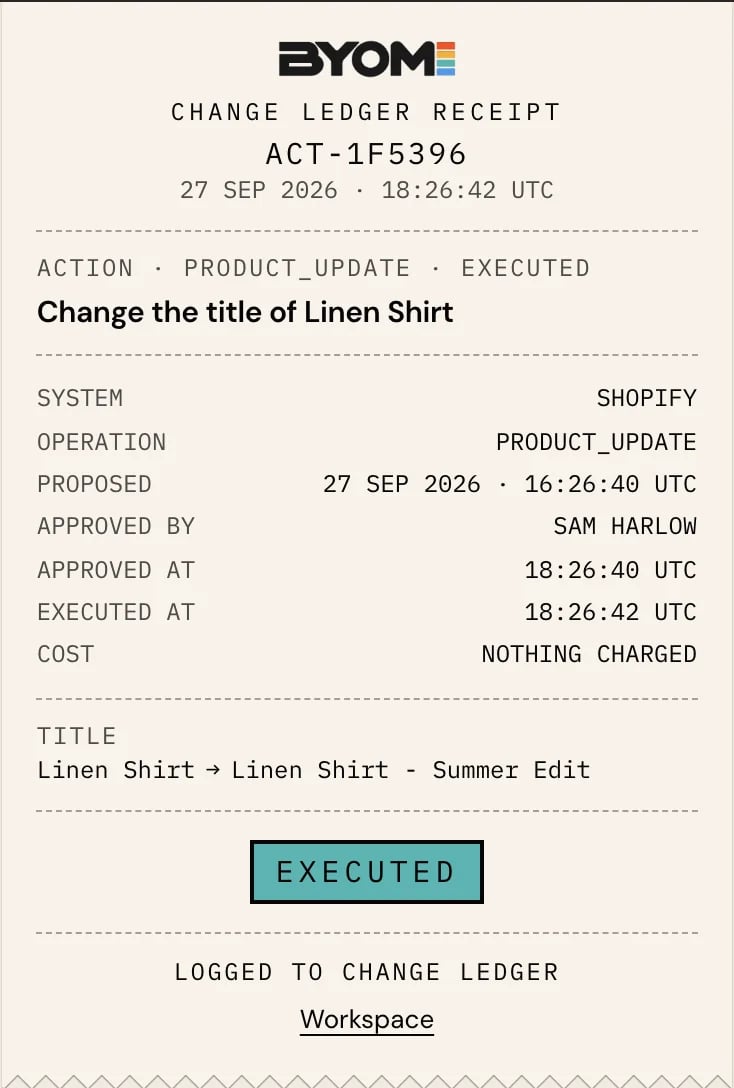 Open the proposed change's detail and select **View receipt** when available. Read the target and recorded result before deciding whether you need to do anything else. Use the detailed operation, identifiers and times to locate the exact change.
Use these distinctions when interpreting the result:
| Result | What you can conclude | What remains to check |
| - | - | - |
| Proposed | Work is ready for a decision. | It has not been authorised or completed merely by being prepared. |
| Approved | A decision was recorded for a version. | Whether the authorised effect has run. |
| Executed | The recorded operation has a reported completed result. | Whether it produced the business outcome you intended. |
| Rejected | The proposal was declined. | Whether you want different work prepared. |
| Simulated | The shown work was a test or simulation. | It is not a completed live provider change. |
| Failed or uncertain | The attempt needs interpretation or recovery. | Individual effects and provider state before retrying. |
For a multi-item change, read individual results. A single summary must not erase the fact that some items completed and others did not.
## Use a supported reversal
**Undo** is offered only when BYOM has a supported reversal for the relevant completed execution and it remains within the available window. If Undo is absent, the operation may not support reversal, the window may have passed, a newer state may block it, or a reversal may already be in progress.
The review can instead say **Cannot be undone here**. Read the reason. Some changes can be put back in the provider manually; other effects cannot be reversed. Do not equate “manual reversal” with “BYOM can undo it now”.
When Undo is offered, review the new effect and any additional verification requested. Reversing a high-risk change can need the same kind of sign-in check as making it. Afterward, inspect the reversal's result rather than assuming a click restored everything.
## Worked example: a partial content change
North Coast Goods approves descriptions for three products. Two updates complete; the third encounters a changed source value. The correct interpretation is “two completed, one unresolved”. Preparing an undo for the completed work should not edit the product whose original change never landed.
Suppose another team member has since improved one of the two descriptions. A blind restore could overwrite that improvement. Compare the current state and the proposed reversal before proceeding. If BYOM cannot safely restore a field, keep that limitation visible and resolve it deliberately.
## Measure the business outcome separately
A successful description update confirms the edit. To establish a sales or conversion improvement, inspect the later measurement. To assess impact, use a compatible measurement window and source coverage. Preserve the operation receipt and the later measurement as separate pieces of evidence.
Reviewed 2 October 2026.
## Related guides
* [Approvals and proposed changes](/product/approvals)
* [Review a proposed change](/guides/review-a-change)
* [Errors, limits and retries](/developers/errors-and-limits)
## Related topics
- [Glossary](/start/glossary.md)
- [Errors, limits and retries](/developers/errors-and-limits.md)
- [Review a proposed change](/guides/review-a-change.md)
- [Troubleshooting](/guides/troubleshooting.md)
- [HQ and Workspace](/product/hq-workspace.md)
This documentation is built and hosted on [Mintlify](https://mintlify.com), a developer documentation platform.
Open the proposed change's detail and select **View receipt** when available. Read the target and recorded result before deciding whether you need to do anything else. Use the detailed operation, identifiers and times to locate the exact change.
Use these distinctions when interpreting the result:
| Result | What you can conclude | What remains to check |
| - | - | - |
| Proposed | Work is ready for a decision. | It has not been authorised or completed merely by being prepared. |
| Approved | A decision was recorded for a version. | Whether the authorised effect has run. |
| Executed | The recorded operation has a reported completed result. | Whether it produced the business outcome you intended. |
| Rejected | The proposal was declined. | Whether you want different work prepared. |
| Simulated | The shown work was a test or simulation. | It is not a completed live provider change. |
| Failed or uncertain | The attempt needs interpretation or recovery. | Individual effects and provider state before retrying. |
For a multi-item change, read individual results. A single summary must not erase the fact that some items completed and others did not.
## Use a supported reversal
**Undo** is offered only when BYOM has a supported reversal for the relevant completed execution and it remains within the available window. If Undo is absent, the operation may not support reversal, the window may have passed, a newer state may block it, or a reversal may already be in progress.
The review can instead say **Cannot be undone here**. Read the reason. Some changes can be put back in the provider manually; other effects cannot be reversed. Do not equate “manual reversal” with “BYOM can undo it now”.
When Undo is offered, review the new effect and any additional verification requested. Reversing a high-risk change can need the same kind of sign-in check as making it. Afterward, inspect the reversal's result rather than assuming a click restored everything.
## Worked example: a partial content change
North Coast Goods approves descriptions for three products. Two updates complete; the third encounters a changed source value. The correct interpretation is “two completed, one unresolved”. Preparing an undo for the completed work should not edit the product whose original change never landed.
Suppose another team member has since improved one of the two descriptions. A blind restore could overwrite that improvement. Compare the current state and the proposed reversal before proceeding. If BYOM cannot safely restore a field, keep that limitation visible and resolve it deliberately.
## Measure the business outcome separately
A successful description update confirms the edit. To establish a sales or conversion improvement, inspect the later measurement. To assess impact, use a compatible measurement window and source coverage. Preserve the operation receipt and the later measurement as separate pieces of evidence.
Reviewed 2 October 2026.
## Related guides
* [Approvals and proposed changes](/product/approvals)
* [Review a proposed change](/guides/review-a-change)
* [Errors, limits and retries](/developers/errors-and-limits)
## Related topics
- [Glossary](/start/glossary.md)
- [Errors, limits and retries](/developers/errors-and-limits.md)
- [Review a proposed change](/guides/review-a-change.md)
- [Troubleshooting](/guides/troubleshooting.md)
- [HQ and Workspace](/product/hq-workspace.md)
This documentation is built and hosted on [Mintlify](https://mintlify.com), a developer documentation platform.