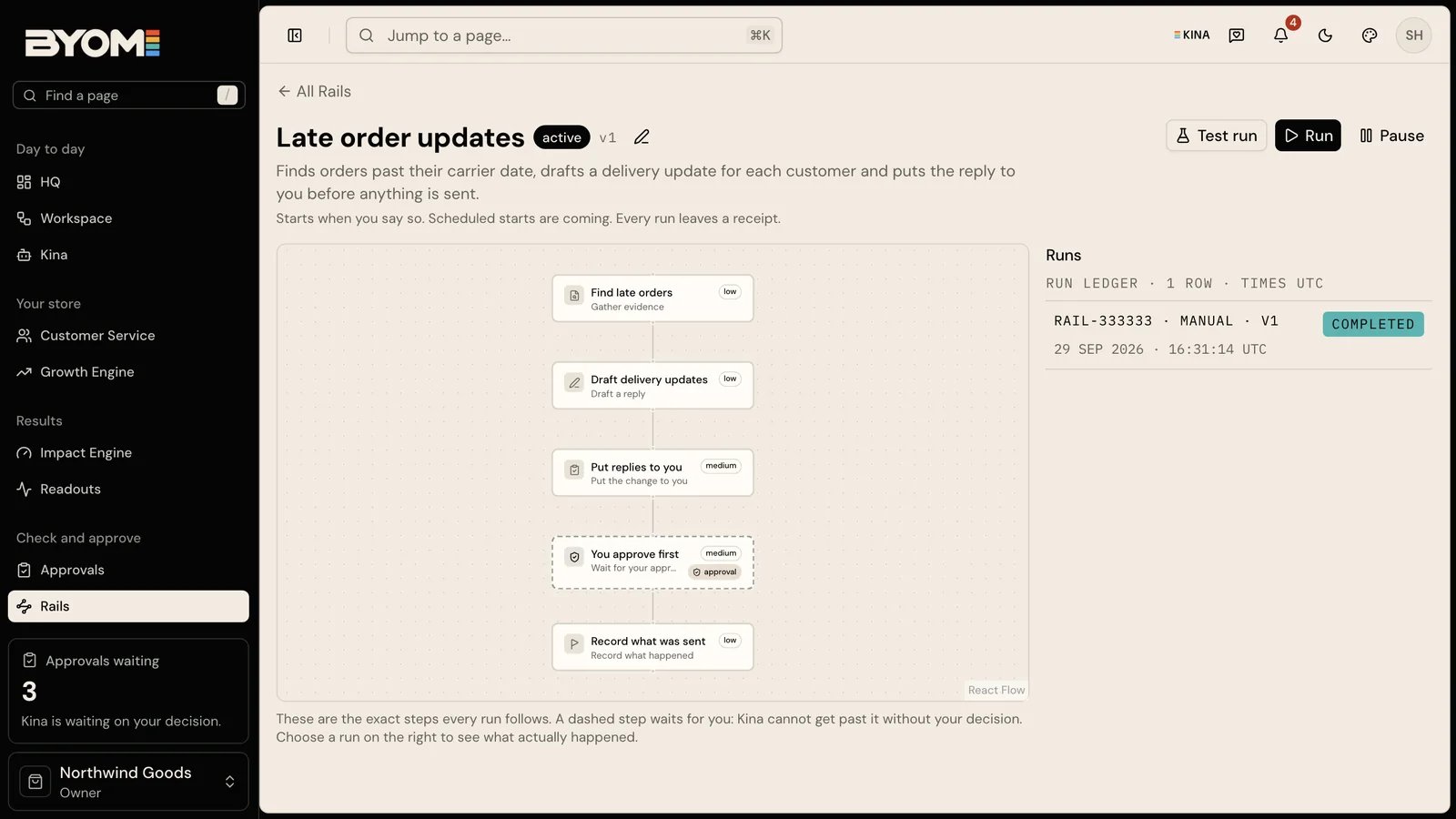

A Rail is a job Kina does for a merchant on repeat, checked at every stage and signed off before anything touches the store. The stages and run history let you inspect its checks, prepared work and result.

Repetition does not remove review

A repeatable job needs a clear input, defined checks and a meaningful result. For example, a regular product-content review could identify gaps, prepare proposed wording and present changes for approval. Scheduling the review does not authorise every future product edit. Each occurrence still depends on valid company membership, available capabilities, current connection access and applicable usage allowances. Check those requirements again when the source or account state changes.

Read a run in stages

Check what the run read, what it prepared, which checks passed and where it stopped. A completed preparation stage and a completed external change are different results. Follow the Action and receipt for any actual change. A useful failure identifies the unfinished stage and its reason. If the source was unavailable, fixing access may be the next step. If a proposed edit failed a check, revise the work before asking for approval.

Availability

A named Rail is usable only when it is enabled and has the checks and provider access for your company. Check the available Rail and scheduling controls in your account before making a job routine.

Inspect and test an enabled Rail

Demo Rail detail showing stages, manual run controls and run information

Illustrative demo Rail detail with a manual start and scheduled starts marked as coming. This example is not evidence of a qualified live Rail or enabled schedule.

Use Rails when a defined job has been made available to your company and you want to understand its checks before running it. Start by reading the Rail’s description and the source information required for the job. Open its detail and inspect the stages. An enabled execution capability is required for Test run or Run; if these controls are unavailable, read the reason. Do not treat seeing a Rail name as permission to run it. Test run is the safe place to inspect the job’s prepared work and checks without treating it as a live store result. Run begins an available run; a consequential store change still follows its own approval boundary. Afterward, use the run history to open the relevant result and receipt. Rail details currently mark scheduled starts as coming. These instructions cover the manual controls; check your account’s scheduling capability before relying on an automatic start.

What a stage tells you

A stage can establish that an input was read, a draft was prepared or a check completed. It should also explain where work stopped. If a run prepared a proposal, follow that proposal to Approvals; the Rail’s completion summary is not approval to make every external change. A test or simulation is not evidence that a real provider accepted an operation. A run receipt and a linked change receipt answer different questions: what the job did, and what a particular external effect did.

Worked example: review before making a job routine

North Coast Goods wants a regular review of missing product-care guidance. Its available job reads a bounded product set, identifies missing guidance and prepares proposed wording from source facts. The first test finds six gaps. Only four have enough verified care information to draft a change. A useful result preserves the two unresolved products and explains the missing facts. It does not invent instructions so that all six pass. Review the four drafts and inspect any resulting proposals. A successful preparation run demonstrates that the job produced reviewable work. It does not prove those edits reached the shop or improved trading. Inspect change receipts for execution and use later measurements for outcomes.

Stop and recover deliberately

Use Pause only when it is offered and you intend to pause the Rail. Before rerunning a failed job, inspect its latest history, the unfinished stage and any already-completed effects. Resolve the blocked source or incorrect work first. An uncertain provider effect must be checked before another run can repeat it. Check already-completed effects so another run does not duplicate a message or change. Reviewed 2 October 2026.